우분투 최초 설치후 외부접속을 시도하게 되면 아래와 같은 메시지 출력후 로그인을 할 수 없게된다
"No supported authentication methods available (server sent: publickey)"

1. 에러발생
위 메시지는 패스워드 방법으로 로그인 할 수 없게 기본설정이(Ubuntu 24.04.1 최신) 되어
있기 때문이다.
이를 해결하기 위해서는 서버의 환경을 콘솔을 통하여 직접 설정하게 되면 그 이후부터는
외부에서 접속을 할 수 있다.
2. 해결방법
우선 ssh 의 설정으라 변경하기 위해 설정파일이 있는 폴더로 간다
$ cd /etc/ssh
$ vi /etc/ssh/sshd_config
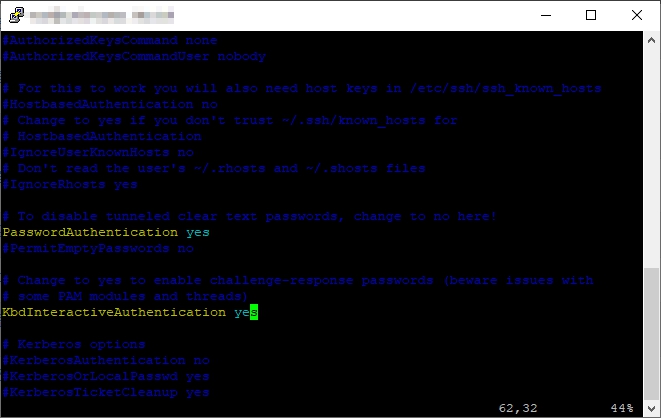
아래의 이 두가지 부분을 찾아서 수정하되 주석처리가 되어 있다면 주석을 제거하고 yes 로 설정한다.
#PasswordAuthentication yes
#KbdInteractiveAuthentication yes
3. 재시작
해당명령으로 ssh 재시작 해준다.
$ sudo ssh restart
4. 확인
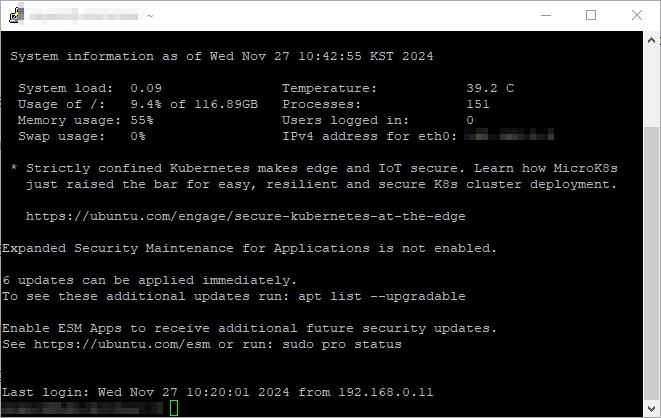
위와 같이 모든작업이 완료되면 외부접속을 시도해보자.
행운을 빈다.










Leave a comment